Clamini library
手軽にナンバープレイス
問題を自動で作成する、ナンバープレイスを作ってみました。 高度な問題は作れませんが、手軽に遊ぶだけなら大丈夫と思います。
ゲーム画面
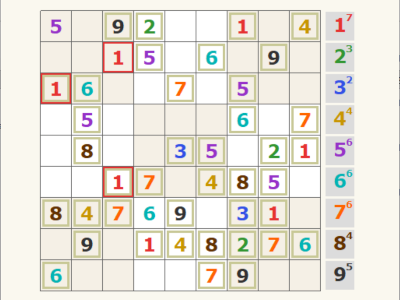
概要
| タイトル | 手軽にナンバープレイス |
|---|---|
| ジャンル | パズル |
| プレイ人数 | 1人 |
| 動作環境 | Windows11 (64bit) |
操作方法
| 左クリック | 選択、決定 |
|---|
使い方
ダウンロード
下のリンクからファイルをダウンロードできます。
numberplace.zip ※ZIP形式で圧縮されてるので、使う前に解凍してね!
遊び方
一般的なナンバープレイスゲームです。条件を満たすように、数字を配置していってください。
問題の難易度は3段階から選ぶことができ、自動で生成されます。
右のパレットから数字を選択して、盤上の空きマスをクリックし配置します(上書き可)。
何も選択せず、盤上の数字を選択することで、数字を消すこともできます。
クリア条件を満たさない配置に対しては、警告が表示されます。
ソースコード
#packopt name "numberplace"
#include "numberplace_solver.as"

; --- 初期設定 ---
#const yohaku 50
#const haba 40

dim board, 9, 9
dim fixed_flag, 9, 9
dim error_flag, 9, 9
dim num_count, 10

selected_num = 0 ; 選択した数字
is_processing = 0 ; プロセス処理中か?
game_state = 0 ; 0:タイトル, 1:生成中, 2:プレイ中

screen 0, 512, 512
title "手軽にナンバープレイス"
randomize

; 数字ごとのカラーテーブル (R, G, B)
dim col_table, 10, 3
col_table(1,0)=230: col_table(1,1)=50 : col_table(1,2)=50  ; 1:赤
col_table(2,0)=50 : col_table(2,1)=150: col_table(2,2)=50  ; 2:緑
col_table(3,0)=50 : col_table(3,1)=80 : col_table(3,2)=230 ; 3:青
col_table(4,0)=200: col_table(4,1)=150: col_table(4,2)=0   ; 4:金
col_table(5,0)=150: col_table(5,1)=50 : col_table(5,2)=200 ; 5:紫
col_table(6,0)=0  : col_table(6,1)=180: col_table(6,2)=180 ; 6:水色
col_table(7,0)=255: col_table(7,1)=100: col_table(7,2)=0   ; 7:オレンジ
col_table(8,0)=100: col_table(8,1)=50 : col_table(8,2)=0   ; 8:茶
col_table(9,0)=50 : col_table(9,1)=50 : col_table(9,2)=50  ; 9:グレー

; --- タイトルアニメーション用設定 ---
max_drops = 10 ; 降らせる数字の数
dim drop_x, max_drops
dim drop_y, max_drops
dim drop_v, max_drops ; 落下速度
dim drop_n, max_drops ; 表示する数字
repeat max_drops
    drop_x(cnt) = rnd(512)
    drop_y(cnt) = rnd(512) - 512
    drop_v(cnt) = rnd(9) + 1
    drop_n(cnt) = rnd(9) + 1
loop

*main_loop
    if game_state == 0 : gosub *draw_title
    if game_state == 2  {
        stick key
        if key & 256 : gosub *on_click
       }
    await 16
    goto *main_loop

; --- タイトル画面の描画と選択 ---
*draw_title
    redraw 0
    ; 背景色
    color 250, 248, 239 : boxf
    title "手軽にナンバープレイス"
    ; --- 背景アニメーション (数字が降る) ---
    font "Arial", 40, 1
    repeat max_drops
        color 230, 225, 210
        pos drop_x(cnt), drop_y(cnt)
        mes drop_n(cnt)
        drop_y(cnt) += drop_v(cnt) / 2.2
        if drop_y(cnt) > 512 {
            drop_y(cnt) = -50
            drop_x(cnt) = rnd(512)
            drop_n(cnt) = rnd(9) + 1
        }
        drop_x(cnt) += drop_v(cnt) / 2
        if drop_x(cnt) > 512 {
            drop_x(cnt) = -50
            drop_y(cnt) = rnd(512)
            drop_n(cnt) = rnd(9) + 1
        }
    loop

    ; --- タイトルロゴ ---
    font "MS Gothic", 42, 1
    pos 74, 84 : color 210, 210, 200 : mes "ナンバープレイス"
    pos 70, 80 : color col_table(3,0), col_table(3,1), col_table(3,2) : mes "ナンバープレイス"
    font "MS Gothic", 16, 1
    pos 155, 175 : color 120, 110, 100 : mes "難易度を選んでください"

    ; --- デザインボタンの描画 ---
    dim btn_y, 3 : btn_y(0)=220, 280, 340
    sdim btn_txt, 3, 20 : btn_txt(0)="初級", "中級", "上級"
    dim btn_col, 3 : btn_col(0)=2, 7, 1

    stick stick_key
    repeat 3
        idx = cnt
        x1 = 156 : y1 = btn_y(idx) : x2 = 356 : y2 = y1 + 45
        color 210, 205, 190 : boxf x1+3, y1+3, x2+3, y2+3
        c_idx = btn_col(idx)
        color col_table(c_idx,0), col_table(c_idx,1), col_table(c_idx,2) : boxf x1, y1, x2, y2
        color 255, 255, 255 : font "MS Gothic", 20, 1
        pos x1 + 75, y1 + 12 : mes btn_txt(idx)

        ; クリック判定
        if (stick_key & 256) {
            if (mousex >= x1) & (mousex <= x2) & (mousey >= y1) & (mousey <= y2) {
                if idx == 0 : target_hints = 45
                if idx == 1 : target_hints = 40
                if idx == 2 : target_hints = 35
                goto *init_game
            }
        }
    loop

    redraw 1
    return

*init_game
    start_time = gettime(4)*3600 + gettime(5)*60 + gettime(6)
    clrobj
    game_state = 1
    gosub *create_game
    game_state = 2
    return

; --- 問題生成 ---
*create_game
    redraw 0
    color 250, 248, 239 : boxf
    pos 150, 240 : color col_table(5,0), col_table(5,1), col_table(5,2) : font "MS Gothic", 20, 1
    mes "問題を生成しています..."
    redraw 1

    repeat
        ; 1. 盤面配列をリセット
        repeat 81 : board(cnt \ 9, cnt / 9) = 0 : loop

        ; 2. 起点となる「1行」または「1列」をランダムに選んで埋める
        dim seed_nums, 9
        repeat 9 : seed_nums(cnt) = cnt + 1 : loop
        ; 1~9をシャッフル
        repeat 9 : r = rnd(9) : tmp = seed_nums(cnt) : seed_nums(cnt) = seed_nums(r) : seed_nums(r) = tmp : loop
        mode = rnd(2)       ; 0:行, 1:列
        target_idx = rnd(9) ; 0~8番目
        repeat 9
            if mode == 0 {
                board(cnt, target_idx) = seed_nums(cnt) ; ランダムな行を埋める
            } else {
                board(target_idx, cnt) = seed_nums(cnt) ; ランダムな列を埋める
            }
        loop

        ; 3. 完成盤面を作成 (バックトラッキング)
        if solve_backtrack(board) == 0 : continue

        ; 4. 数字のランダム置換 (見た目の連番・パターンを解消)
        dim replace_table, 10
        dim shuffle_nums, 9
        repeat 9 : shuffle_nums(cnt) = cnt + 1 : loop
        repeat 9 : r = rnd(9) : tmp = shuffle_nums(cnt) : shuffle_nums(cnt) = shuffle_nums(r) : shuffle_nums(r) = tmp : loop
        repeat 9 : replace_table(cnt + 1) = shuffle_nums(cnt) : loop
        repeat 81
            tx = cnt \ 9 : ty = cnt / 9
            if board(tx, ty) != 0 : board(tx, ty) = replace_table(board(tx, ty))
        loop

        ; 5. 穴あけ候補の順番をランダムに決める
        dim hole_order, 81
        repeat 81 : hole_order(cnt) = cnt : loop
        repeat 81 : r = rnd(81) : tmp = hole_order(cnt) : hole_order(cnt) = hole_order(r) : hole_order(r) = tmp : loop

        ; 6. 1マスずつ削れるかテストしていく
        current_hints = 81
        idx_ptr = 0

        while (idx_ptr < 81)
            idx = hole_order(idx_ptr)
            tx = idx \ 9 : ty = idx / 9
            temp_val = board(tx, ty)
            board(tx, ty) = 0

            gosub *board_to_str
            res_flag = 0
            dummy = solve_numberplace(q_str, res_flag)

            if res_flag == 1 {
                current_hints--
            } else {
                board(tx, ty) = temp_val ; 唯一解でなくなるなら削らない
            }

            ; 目標ヒント数に達したら終了
            if current_hints <= target_hints : break

            idx_ptr++
            if idx_ptr \ 10 == 0 : await 1 ; フリーズ防止
        wend

        ; 目標数に達した、あるいは全マス走査したらループを抜ける
        if current_hints <= target_hints : break
        await 1
    loop

    title "手軽にナンバープレイス - 初期配置 : " + current_hints

    ; 7. 確定した盤面を固定フラグに反映
    repeat 81
        tx = cnt \ 9 : ty = cnt / 9
        if board(tx, ty) != 0 : fixed_flag(tx, ty) = 1 : else : fixed_flag(tx, ty) = 0
    loop

    ; エラー状態の更新と描画
    gosub *update_error_status
    gosub *draw_screen
    return

; --- 盤面配列を文字列(q_str)に変換 ---
*board_to_str
    q_str = ""
    repeat 81
        tx = cnt \ 9 : ty = cnt / 9
        q_str += str(board(tx, ty))
    loop
    return

; --- 全マスのエラーチェックと個数カウント一括処理 ---
*update_error_status
    ; --- 1. 準備 ---
    repeat 10 : num_count(cnt) = 0 : loop

    ; スタックの初期化(全81マスをチェック対象として積む)
    dim check_stack, 81
    stack_ptr = 0
    repeat 81 : check_stack(stack_ptr) = cnt : stack_ptr++ : loop

    ; --- 2. スタックが空になるまでループ ---
    while stack_ptr > 0
        ; スタックから一つ取り出す (Pop)
        stack_ptr--
        i = check_stack(stack_ptr)

        tx = i \ 9 : ty = i / 9
        error_flag(tx, ty) = 0
        val = board(tx, ty)

        ; 空マスなら次のスタック要素へ
        if val != 0 {
            num_count(val)++

            ; --- 3. 重複チェック ---
            is_err = 0

            ; 行・列チェック
            repeat 9
                if (cnt != tx) & (board(cnt, ty) == val) : is_err = 1 : break
                if (cnt != ty) & (board(tx, cnt) == val) : is_err = 1 : break
            loop
            if is_err : error_flag(tx, ty) = 1

            ; 3x3ブロックチェック
            bx = (tx / 3) * 3 : by = (ty / 3) * 3
            repeat 9
                cx = bx + (cnt \ 3) : cy = by + (cnt / 3)
                if (cx == tx) & (cy == ty) : continue
                if board(cx, cy) == val : is_err = 1 : break
            loop
            if is_err : error_flag(tx, ty) = 1
        }
        wend

    clear_cnt = 0 : is_clear = 0
    repeat 9
        if (num_count(cnt + 1) < 9) : clear_cnt = 1 : break
    loop
    if (is_err == 0) & (clear_cnt == 0) : is_clear = 1

    return

; --- クリック処理 ---
*on_click
    if is_processing == 1 : return
    is_processing = 1
    if is_clear { is_processing = 0 : return }
    mx = mousex : my = mousey
    tx = (mx - yohaku) / haba : ty = (my - yohaku) / haba
    px = yohaku + 9 * haba + 5

    ; パレット選択
    if (mx >= px) & (mx <= px + haba) {
        idx = (my - yohaku + haba) / haba
        if (idx >= 1) & (idx <= 9) & (num_count(idx) < 9) : selected_num = idx
        gosub *draw_screen
        is_processing = 0
        return
    }

    ; 盤面入力
    if (tx >= 0) & (tx < 9) & (ty >= 0) & (ty < 9) {
        if fixed_flag(tx, ty) == 0 {
            if (selected_num != 0) {
                if (num_count(selected_num) >= 9) & (board(tx, ty) != selected_num) {
                    is_processing = 0
                    return
                }
            }
            board(tx, ty) = selected_num
            selected_num = 0
            gosub *update_error_status
        }
    }

    gosub *draw_screen
    is_processing = 0
    return

; --- 描画処理 ---
*draw_screen
    redraw 0
    color 250, 248, 239 : boxf

    repeat 81
        tx = cnt \ 9 : ty = cnt / 9
        val = board(tx, ty)

        ; 背景色決定
        if error_flag(tx, ty) == 1 {
            color 230, 50, 50 ; 重複エラー
        } else {
            if ((tx/3 + ty/3) \ 2 == 0) : color 245, 240, 230 : else : color 255, 255, 255
        }
        ; マスの描画
        boxf yohaku + tx * haba, yohaku + ty * haba, yohaku + (tx+1) * haba, yohaku + (ty+1) * haba
        ; 初期配置(ヒント)の数字は小さな枠を表示して区別
        if fixed_flag(tx, ty) == 1 {
            color 200, 200, 150
        } else {
            if ((tx/3 + ty/3) \ 2 == 0) : color 245, 240, 230 : else : color 255, 255, 255
        }
        boxf yohaku + tx * haba + 3, yohaku + ty * haba + 3, yohaku + (tx+1) * haba - 3, yohaku + (ty+1) * haba - 3
        if ((tx/3 + ty/3) \ 2 == 0) : color 245, 240, 230 : else : color 255, 255, 255
        boxf yohaku + tx * haba + 6, yohaku + ty * haba + 6, yohaku + (tx+1) * haba - 6, yohaku + (ty+1) * haba - 6

        if val != 0 {
            color col_table(val, 0), col_table(val, 1), col_table(val, 2)
            font "Verdana", 24, 1
            pos yohaku + tx * haba + 12, yohaku + ty * haba + 6
            mes val
        }
    loop

    ; 枠線
    color 100, 100, 100
    repeat 10
        lw = 1 : if cnt \ 3 == 0 : lw = 3
        line yohaku + cnt * haba, yohaku, yohaku + cnt * haba, yohaku + 9 * haba
        line yohaku, yohaku + cnt * haba, yohaku + 9 * haba, yohaku + cnt * haba
    loop

    ; 右側のパレット描画
    px = yohaku + 9 * haba + 5
    repeat 9, 1
        cur_n = cnt
        py = yohaku + (cur_n-1) * (haba)

        if selected_num == cur_n {
            color 200, 150, 0 : boxf px + 2, py + 2, px + haba - 2, py + haba - 2
            color 255, 200, 0 : boxf px + 4, py + 4, px + haba - 4, py + haba - 4
        } else {
            if num_count(cur_n) >= 9 : color 80, 80, 80 : else : color 220, 220, 220
            boxf px + 2, py + 2, px + haba - 2, py + haba - 2
        }

        if num_count(cur_n) >= 9 : color 150, 150, 150 : else : color col_table(cur_n,0), col_table(cur_n,1), col_table(cur_n,2)
        font "Verdana", 24, 1 : pos px + 12, py + 4 : mes cur_n
        font "Verdana", 12, 1 : pos px + 28, py + 2 : mes num_count(cur_n)
    loop
    redraw 1

    ; クリア時の演出
    if is_clear {
        ; 予備の画面(バッファ ID 1)を使って白い板を作る
        buffer 1, 512, 512
        color 255, 255, 255 : boxf

        gsel 0
        gmode 3, 9 * haba, 9 * haba, 128
        pos yohaku, yohaku
        gcopy 1, 0, 0

        font "Verdana", 60, 1
        color 180, 180, 180 : pos 94, 184 : mes "CLEARED!!"
        color 255, 120, 0 : pos 90, 180 : mes "CLEARED!!"

        ; タイム表示
        now_time = gettime(4)*3600 + gettime(5)*60 + gettime(6)
        total_sec = now_time - start_time
        if total_sec < 0 : total_sec += 86400
        m = total_sec / 60 : s = total_sec \ 60
        font "Verdana", 25, 1 : color 50, 50, 50
        pos 165, 270 : mes "TIME: " + m + "m " + s + "s"

        repeat
            stick sk : if sk & 256 : break
            await 16
        loop

        is_clear = 0 : game_state = 0 : selected_num = 0 : is_processing = 0
        goto *main_loop
    }
    return

; --- 関数の定義 ---
#module np_func_mod

; --- バックトラッキング ---
#defcfunc solve_backtrack array _board
    ; 1. 空きマスの座標リストを作成
    dim _empty_x, 81 : dim _empty_y, 81 : _empty_cnt = 0
    repeat 81
        if _board(cnt \ 9, cnt / 9) == 0 {
            _empty_x(_empty_cnt) = cnt \ 9
            _empty_y(_empty_cnt) = cnt / 9
            _empty_cnt++
        }
    loop
    if _empty_cnt == 0 : return 1

    ; 2. 各空きマスで「現在何番目の数字まで試したか」を保持するスタック
    dim _try_v, 81 ; 初期値はすべて0
    _ptr = 0 ; 現在どの空きマス(0 ~ _empty_cnt-1)を処理しているか

    ; 3. メインループ
    while (_ptr >= 0) & (_ptr < _empty_cnt)
        _tx = _empty_x(_ptr) : _ty = _empty_y(_ptr)
        _v = _try_v(_ptr) + 1 ; 次の数字(1~9)から試す
        _success = 0
        repeat 10 - _v, _v
            _cur_v = cnt
            _flag = 1

            ; 1. 行・列チェック
            repeat 9
                if _board(cnt, _ty) == _cur_v : _flag = 0 : break
                if _board(_tx, cnt) == _cur_v : _flag = 0 : break
            loop
            if _flag == 0 : continue

            ; 2. 3x3ブロックチェック
            _bx = (_tx / 3) * 3 : _by = (_ty / 3) * 3
            repeat 3
                _c_y = _by + cnt
                repeat 3
                    _c_x = _bx + cnt
                    if _board(_c_x, _c_y) == _cur_v : _flag = 0 : break
                loop
                if _flag == 0 : break
            loop
            if _flag == 0 : continue

            if _flag {
                _board(_tx, _ty) = _cur_v ; 数字を置く
                _try_v(_ptr) = _cur_v     ; 試した数字を記録
                _success = 1 : break
            }
        loop

        if _success {
            _ptr++
        } else {
            ; 1~9まで全滅ならバックトラック
            _board(_tx, _ty) = 0
            _try_v(_ptr) = 0 ; このマスの試行記録をリセット
            _ptr--          ; 一つ前の空きマスに戻る
        }
    wend

    if _ptr == _empty_cnt : return 1
    return 0

#global
|